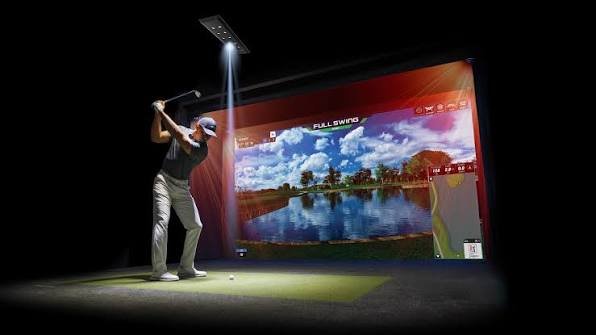
Golf simulator software is not one single app. It is a category of programs that turn your real golf shots into play on virtual courses.
The main thing most searchers want is simple. They want to know which program fits their launch monitor, their budget, and the way they like to play.
This guide compares the leading options for home use in the United States. It starts with compatibility, because that choice matters more than graphics or course count.
What Golf Simulator Software Actually Does
A launch monitor measures your real shot. It tracks ball speed, launch angle, spin, and direction, though the exact data depends on the model.
The software takes that data and shows the result. You see your ball fly on a virtual fairway, land on a green, or roll toward the hole.
Most programs offer full rounds, practice ranges, and skill games. Some also offer online play, leagues, and tournaments with other golfers.
Good software does more than look nice. It should read your shots fast, show clear distances, and keep scoring simple during a round.
Graphics matter, but they are not the whole story. A pretty course is less fun if shots lag, misread, or crash during play.
How to Pick Golf Simulator Software for Your Launch Monitor
Start with your launch monitor, not with a software ad. A launch monitor is the device that measures your shots, such as a Garmin R10, FlightScope Mevo+, SkyTrak+, or Uneekor unit.
Check the software maker’s compatibility list for your exact model. Support can differ even between two models from the same brand.
Next, check what your launch monitor already includes. Some monitors bundle a starter course package, a range app, or a limited version of E6 Connect.
Then check the device you will run it on. GSPro needs a Windows PC, while some other options run on a PC, iPad, or phone.
Also check for stacked costs. Some monitors need their own paid plan before third-party software will unlock, so the software price may not be your only yearly cost.
Finally, think about how you will use it. Serious practice, family game nights, and online leagues point to different programs.
Best Golf Simulator Software Compared: GSPro, E6 Connect, TGC 2019, and Awesome Golf
The table below gives a quick view of the four most common home choices. Prices change, so confirm the current price on the official seller page before you buy.
| Software | Best for | Price model | Runs on | Course library |
|---|---|---|---|---|
| GSPro | Realism and online leagues | $250 per year | Windows PC | 2,500+ community courses |
| E6 Connect | Polished play and iPad use | $1,000 one-time Home license; $300 or $600 per year subscriptions | PC or iOS | 27 owned courses with Home; more with a subscription |
| TGC 2019 | Huge library with no subscription | About $950 one-time | Windows PC | 170,000+ user-created courses |
| Awesome Golf | Family games and practice | $14.99 per month, $159.99 per year, or $349.99 lifetime | PC, iOS, or Android, depending on monitor | Growing library |
GSPro: Best for Realism and Online Play
GSPro is popular with serious home golfers. It offers detailed graphics, realistic ball flight, and a large library of community-made courses.
A subscription runs about $250 per year, and it opens a library of more than 2,500 courses. It works with many launch monitors, including Uneekor, FlightScope, Garmin, and Foresight models.
Its main limit is the computer. GSPro runs on a Windows PC only, so Mac-only and iPad-only golfers need a different option.
It is also strong for online play. Leagues, tours, and online rounds make it a good fit if you want to compete from home.
E6 Connect: Best Polished All-Rounder
E6 Connect, made by TruGolf, is one of the most polished simulator programs. It feels clean, runs well, and suits both practice and casual rounds.
The Home license costs $1,000 one-time and includes 27 courses. Optional subscriptions cost $300 per year for Basic or $600 per year for Expanded, with more courses and content.
E6 Connect runs on PC or iOS, which helps in smaller rooms. An iPad setup can be simpler than a full gaming PC setup, though support still depends on your launch monitor.
It also has broad hardware support. That makes it a safe shortlist choice if you own a SkyTrak+, Mevo+, Garmin R10, or Uneekor unit.
TruGolf also sells the newer E6 Apex as a subscription product. Check which E6 version your launch monitor supports before you pay, since names and tiers can be confusing.
TGC 2019: Best for a Huge Course Library
TGC 2019, short for The Golf Club 2019, is known for sheer course volume. It offers more than 170,000 user-created courses, though quality varies because users design many of them.
It costs about $950 as a one-time lifetime license, with no yearly software subscription. That can make long-term costs easier to predict.
It also includes a course designer. You can build your own holes, share them, and play courses made by other golfers.
The trade-off is age. Its graphics look older than GSPro or E6 Apex, and some newer launch monitors are moving away from supporting it.
TGC 2019 still suits golfers who want variety on a fixed budget. Just confirm support for your exact launch monitor first, since that support is the deal-breaker.
Awesome Golf and Other Family-Friendly Options
Awesome Golf is a lighter, more playful option. It focuses on practice games, challenges, and short formats that work well for families and beginners.
Its US pricing is listed as $14.99 per month, $159.99 per year, or $349.99 lifetime, with a 14-day trial. Its course library is smaller than GSPro or TGC 2019, but it is still growing.
Creative Golf is another family-friendly choice with real courses and mini-games. Brand software also matters, such as Garmin Home Tee Hero, Foresight FSX, Uneekor View, and TrackMan Virtual Golf.
These brand programs often work best with their own hardware. They can be great if you already own that brand, but they may not transfer if you switch monitors later.
What Golf Simulator Software Costs Over 3 Years: A Worked Example
A yearly price can hide the real cost. A one-time license can look costly in year one, then look cheap by year three.
Use this simple formula:
3-year software cost = one-time license + (yearly subscription × 3)
Now apply it to the listed prices above:
- GSPro: $0 + ($250 × 3) = $750
- TGC 2019: $950 + ($0 × 3) = $950
- E6 Connect Home only: $1,000 + ($0 × 3) = $1,000
- E6 Connect Home + Basic: $1,000 + ($300 × 3) = $1,900
This example covers software only. It does not include a launch monitor plan, a gaming PC, a projector, a screen, or a hitting mat.
That distinction matters. A $250 program can still cost far more if it forces you to buy a new PC, while an iPad-friendly program may save that cost.
Also check what happens if you stop paying. Some subscriptions end all access, while a one-time license may keep its included courses.
What Your Computer and Room Need to Run Golf Simulator Software
GSPro needs a Windows gaming PC with a strong graphics card. A basic office laptop will often struggle, lag, or fail to load detailed courses.
TGC 2019 also needs a Windows PC. Check its minimum specs on the official page, and leave room for updates and course downloads.
E6 Connect is more flexible for some monitors because it runs on PC or iOS. That can help if you already own a strong iPad and want a simpler setup.
Your display matters too. Most home setups use a projector and impact screen, while some use a large TV or a net for range-only practice.
Leave safe swing space around the hitting area. Also follow your launch monitor manual for placement, since distance from the ball affects shot readings.
Test the full chain before you finish your room. The monitor, software, display, and network should all work together during a full round, not just on the range.
Common Mistakes When Choosing Golf Simulator Software
- Buying software before checking compatibility. Your launch monitor model, not just its brand, decides what will actually run.
- Ignoring stacked subscriptions. Your monitor may need its own paid plan, plus the software subscription, plus a course pack.
- Paying for courses you will never play. A library of 170,000 courses sounds great, but most golfers return to a small set of favorites.
- Forgetting the PC cost. GSPro is affordable as software, but a new gaming PC can cost more than several years of subscriptions.
- Skipping the trial or demo. A short trial can reveal lag, awkward menus, or putting that feels wrong before you commit.
FAQs About Golf Simulator Software
Do I need a launch monitor to use golf simulator software?
Yes, for real golf shots. The software needs shot data from a launch monitor to move your virtual ball.
Without one, you may browse menus or watch demos, but you cannot play a real round with your own swing.
Can I use GSPro with a SkyTrak launch monitor?
GSPro does not natively support SkyTrak or SkyTrak+ in current listings. Unofficial workarounds exist, but they are not a good choice for most beginners.
If you own a SkyTrak, E6 Connect or TGC 2019 are safer starting points. Always confirm current support before you buy.
Is golf simulator software free?
Some brand apps include a free basic range mode. Full course play, online leagues, and large course libraries are usually paid.
A few programs offer free trials, which are useful for testing speed and feel. Read what the free tier includes before you judge a program.
Does E6 Connect work on Android?
No, current listings describe E6 Connect as PC or iOS only. Android support is not part of its standard home offering.
If Android is your only device, check Awesome Golf or your launch monitor’s own app instead. Confirm the exact device list for your monitor model.
Which golf simulator software is best for beginners and families?
Awesome Golf and Creative Golf are strong family picks. They focus on short games, clear scoring, and fun formats rather than deep swing data.
E6 Connect is a good middle choice if you want polish plus real courses. GSPro suits golfers who already take practice and online play seriously.
Conclusion
Golf simulator software turns real shots into virtual rounds, but the best choice depends on your launch monitor first. Compatibility, device, and total yearly cost matter more than a single feature or screenshot.
GSPro leads for realism and online play on a Windows PC. E6 Connect leads as a polished all-rounder with an iPad option, while TGC 2019 offers a huge library without a subscription.
Check your exact launch monitor model, add any monitor plan to the software price, and try a trial or demo when one is offered. That one check can save you from buying software that never runs well in your room.
Related Articles
2D Animation Software: The Best Tools for Beginners and Pros
VBox Software: A Complete Guide to Oracle VM VirtualBox
KAIYUN SPORTS: The Growing Influence of Online Sports Entertainment in Asia
How to Maintain Weight Loss After Wegovy: Tips and Strategies